How do I update my Project Zomboid server to b42?
Project Zomboid b42 Multiplayer Unstable
Section titled “Project Zomboid b42 Multiplayer Unstable”The new beta update allows for multiplayer Project Zomboid servers. There’s never been a better time to host your own server to play with the new changes.
Setting the Server to Beta
Section titled “Setting the Server to Beta”To use the beta do the following:
- Open the Blacksmith’s Portal
- Stop the server
- Create a backup from the
Backupstab - Go to
Startup - Set Steam Beta Branch to “unstable”
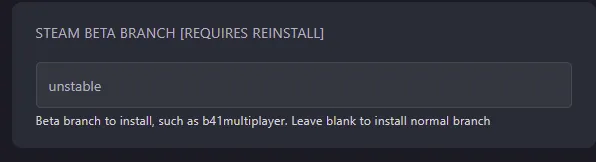
- Go to
Settingsand clickReinstall Server - Start your server once it has finished installing