How do I disable anti-cheat on my ARK: Survival Evolved server?
Quick Links
Section titled “Quick Links”- Using AleForge’s Blacksmith’s Portal
- Self-Hosting/Other Providers
You may want to disable Battle Eye Anti-Cheat on your server to allow previously banned players to connect to your server. Here’s how you can do that.
Title of the section we are completing
Section titled “Title of the section we are completing”Using Blacksmith’s Portal
Section titled “Using Blacksmith’s Portal”- Open the Blacksmith’s Portal
- Go to
Startup - Toggle
Battle-Eyeoff
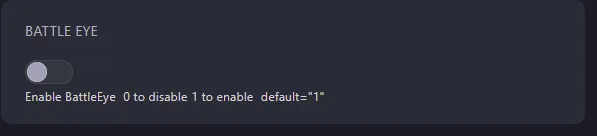
- Restart your server
Self-Hosting/Other Providers
Section titled “Self-Hosting/Other Providers”- Open your servers installation directory
- Open the startup script for your server
- Add the following line
-NoBattleEyeto the end of the script - Restart your server
Closing
Section titled “Closing”Now you know how to disable the anti-cheat on your server!
Get your own super powered and affordable ARK: Survival Evolved server today!