How do I password protect my Icarus server?
Quick Links
Section titled “Quick Links”- Using AleForge’s Blacksmith’s Portal
- Self-Hosting/Other Providers
You can set a password for your Icarus server so that only players with the password may join. Here’s how you can do that.
Configuring a Password for your server
Section titled “Configuring a Password for your server”Using Blacksmith’s Portal
Section titled “Using Blacksmith’s Portal”- Open the Blacksmith’s Portal
- Go to
Startup - Change
Join Passwordto your desired value
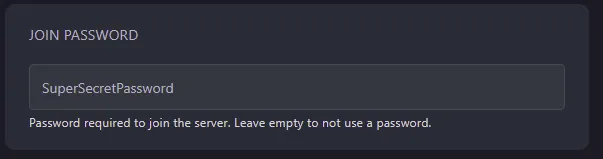
- Restart your server
Self-Hosting/Other Providers
Section titled “Self-Hosting/Other Providers”- Open the directory in which your server is installed
- Open Icarus/Saved/Config/WindowsServer/ServerSettings.ini
- Change
JoinPassword=to your desired password
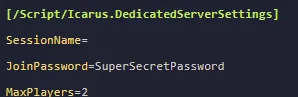
- Restart your server
Closing
Section titled “Closing”Your server will now be password protected!
Get your own super powered and affordable Icarus server today!