How do I change my Hytale server name?
Quick Links
Section titled “Quick Links”- Using AleForge’s Blacksmith’s Portal
- Self-Hosting/Other Providers
This guide will walk you through changing your Hytale server’s name. Here’s how.
Changing your Hytale Server Name
Section titled “Changing your Hytale Server Name”Using the Blacksmith’s Portal
Section titled “Using the Blacksmith’s Portal”- Open the Blacksmith’s Portal
- Go to
Startup - Change
Server Nameto your desired value
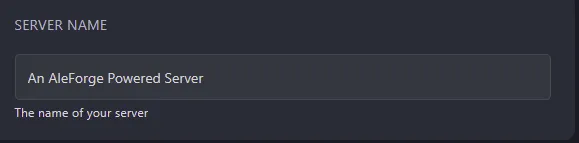
- Restart your server
Self-Hosting/Other Providers
Section titled “Self-Hosting/Other Providers”- Go to your server files
- Open
config.json - Search for
Server Nameand change the name of your server
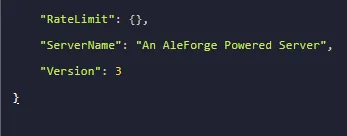
- Restart your server
Closing
Section titled “Closing”Now you know how to set a custom server name for your server!
Get your own super powered and affordable Hytale server today!