How do I setup the OpenStack CLI?
To set up the OpenStack CLI, you must have a machine running Linux. This can be your own hardware or a Qube. If you have a Windows machine, you can install the OpenStack CLI using WSL. You can find more information on how to install WSL here. We will be running CentOS Stream 9 for the purposes of this guide.
Setting up the OpenRC file.
Section titled “Setting up the OpenRC file.”First we’ll need to create an API user and get an OpenRC file. Go to Cloud -> API Users. Click the blue plus icon.
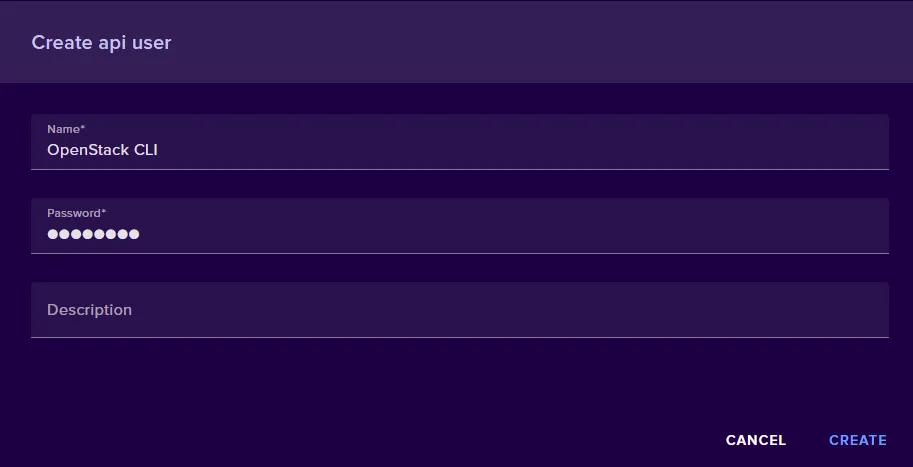
Give your API user a name, a password, and optionally a description. Now click Create. Once your API user has been created. click the download arrow to download the OpenRC file.
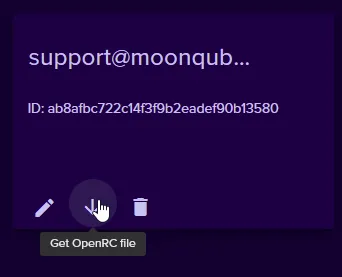
Now, login or SSH into your Linux instance. Create a file on your Linux machine and copy the contents of your OpenRC file to it.
Creating and Activating a Python Virtual Environment
Section titled “Creating and Activating a Python Virtual Environment”In a default CentOS 9 Stream installation, the system’s Python executable is
/usr/libexec/platform-python and is what will be used to create the virtual
environment.
Use /usr/libexec/platform-python -m venv ~/venv to create a virtual
environment in path ~/venv
Next, we’ll use source ~/venv/bin/activate to activate the virtual
environment.
Installing OpenStackClient
Section titled “Installing OpenStackClient”Before installing OpenStackClient we should upgrade pipto ensure the
installation goes smoothly. You can upgrade pip by using pip install -—upgrade pip
Now that we have prepared everything, we can install the OpenSttackClient.
There exist two OpenStackClient packages:python-openstackclient and
openstackclient. We recommend using python-openstackclient because it is
maintained much more frequently than the prior package.
Install OpenStackClient using pip install python-openstackclient
Activate User Authentication
Section titled “Activate User Authentication”The previously created OpenRC file is now used to set environment variables related to authentication.
For example, source ~/openrc.sh Enter the password you set for the API
user.
With all of that done, you can use openstack server list to ensure you’ve
installed the OpenStackClient correctly.